● Features

What ReadMyBlueprint does, and what it doesn't.

Upload a digital plan set and get studs, track, drywall, insulation and block counts back, every number traced to the wall it came from, anything uncertain flagged for you.

Updated October 2026

Try your first plan set free →Watch it work
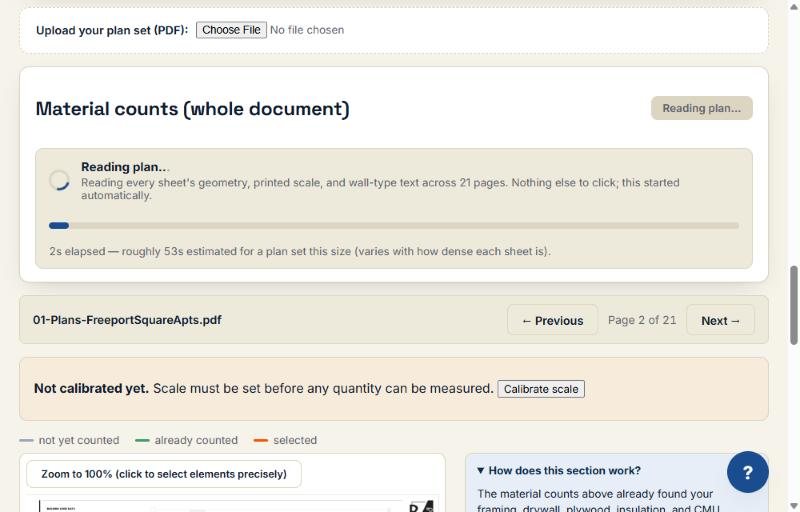
Reading plan progress bar, 21 pages
Real screenshot, Freeport Square Apartments test set.

Reading the plan set

  • Upload the whole PDF as-is. No tracing, no clicking walls.
  • It starts scanning every page automatically: wall geometry, the printed scale and the wall-type text. The 21-page Freeport Square set took about a minute.
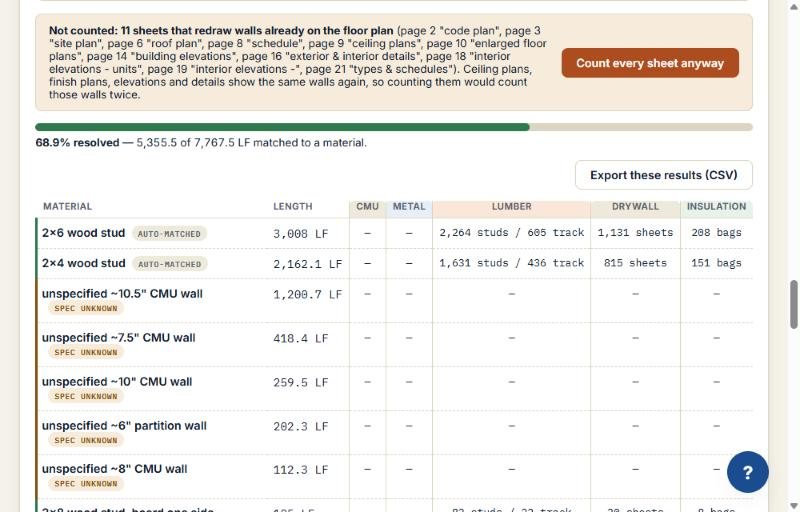
  • Ceiling plans, elevations and details redraw walls already on the floor plans. It sets those sheets aside so it won't count the same wall twice, and tells you which ones.
  • A 100+ page plan set can take several minutes. Every plan set you upload stays listed under "Your projects."
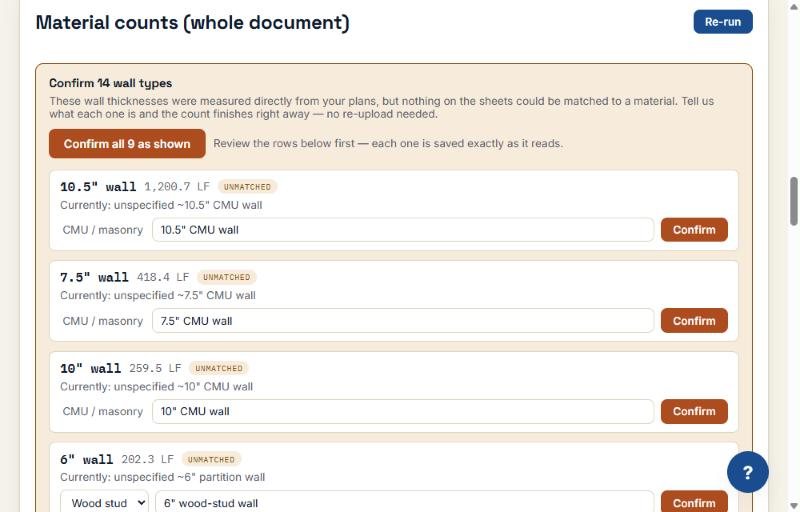
Confirm wall types panel with a Confirm all button
Real screenshot, Freeport Square Apartments test set.

Wall measurement & wall-type matching

  • Every wall is measured directly from the vector data in your plan set: its length and drawn thickness, calibrated to the sheet's own printed scale.
  • That thickness is checked against the wall-type legend already drawn on your plan set.
  • One legend match: matched. More than one: ambiguous, with every candidate shown. None: needs confirmation. Never silently assigned a best guess.
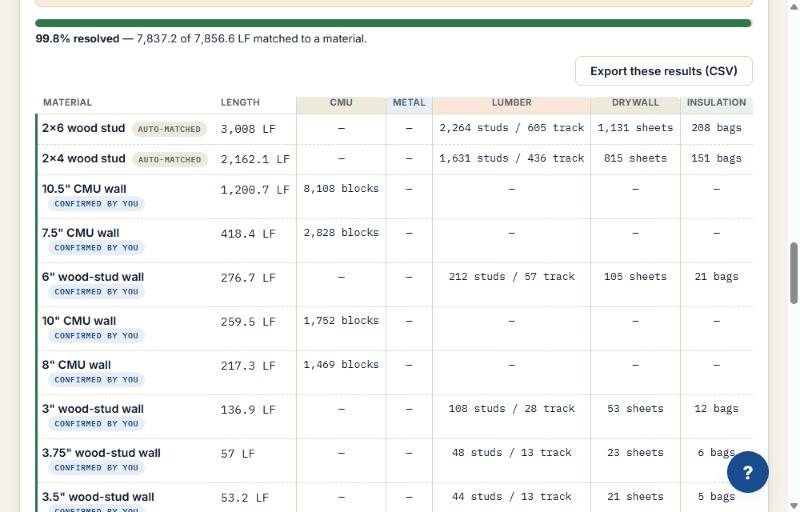
  • Flagged walls get a suggested type; you check and confirm them, in one click with "Confirm all", with no re-upload. In the tour run, resolved walls went from 68.9% to 99.8%.
Results table with 2x6 and 2x4 wood stud walls auto-matched and rows labeled SPEC UNKNOWN
Real screenshot, Freeport Square Apartments test set.

Confidence labels & flags

  • Every auto-detected result is labeled matched, ambiguous, or needs confirmation. Never left unmarked.
  • Rows the tool can't identify show as SPEC UNKNOWN and are left out of the totals until you confirm them.
  • You can override any flagged result. Your confirmation is recorded as yours, not silently reclassified as "matched."
  • An unconfirmed row stays flagged in your export. It is never quietly turned into a confident-looking number.
99.8% resolved, with CMU block counts filled in
Real screenshot, Freeport Square Apartments test set.

Materials output per trade

  • One results table with a column per material: CMU, Metal, Lumber, Drywall, Insulation.
  • Drywall: a sheet count you can trace back to the wall. Metal framing: steel stud and track count tied to the gauge on your own legend.
  • Wood framing: wood stud and plywood counts from the actual wall. Insulation: coverage tied to the wall cavity. CMU: a block count from real wall area.
  • In the tour run, the 2x6 walls came back as 3,008 LF, 2,264 studs, 605 track, 1,131 drywall sheets and 208 bags of insulation, and 8,108 CMU blocks for the 10.5-inch walls.
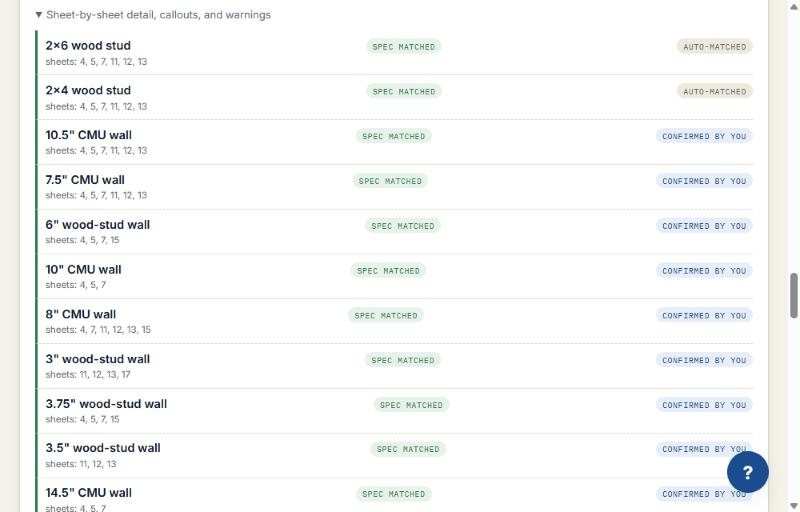
Sheet-by-sheet detail listing source sheets per material
Real screenshot, Freeport Square Apartments test set.

Export CSV / Excel

  • "Export these results (CSV)" turns the results table into a spreadsheet you can open in Excel and drop into a bid.
  • Every export includes the label column, so anyone reviewing the file sees what was verified and what wasn't.
  • Each material lists the sheets it was counted on, so you can check any line against the drawing before it goes in a bid.
  • Read-only API keys are available from your account, scoped to your own documents and material summaries.
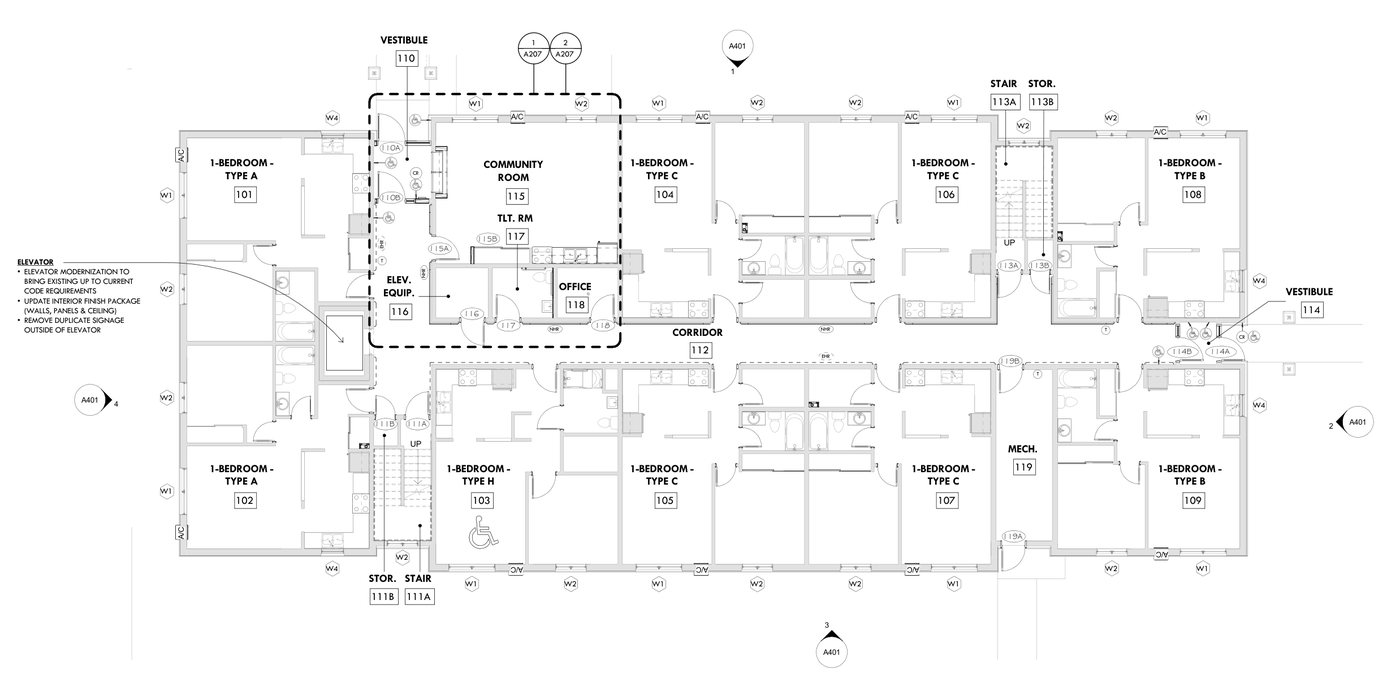
First floor plan, sheet A201, Freeport Square Apartments
Real screenshot, Freeport Square Apartments test set.

Supported files & limits

  • Needs a real digital plan file exported from design software such as AutoCAD or Revit.
  • A scanned or photographed page has no drawing data to measure, so the tool says it can't measure that page rather than guess. If only some pages are scanned, the digital pages still work.
  • Wall types are checked against the legend on your own plan set. If the plan set has no legend, every wall is still measured, but results mostly come back as needs confirmation.
  • Solo Estimator includes 10 plan sets a month; Small Firm is unlimited. See pricing.
Results table showing rows marked SPEC UNKNOWN and left out of the totals
Real screenshot, Freeport Square Apartments test set.

What it doesn't do

  • It doesn't read scanned, photographed or flat-image PDFs.
  • It doesn't guess a wall's material to make a number look complete.
  • It doesn't auto-detect doors, windows, pipe, fixtures or other one-off items. Add those with a click on the drawing or "Manual count"; they go into the same takeoff.
  • It doesn't publish a single blended accuracy percentage. Results are labeled row by row, and the tested numbers are on the accuracy page.
  • The API can't upload, edit or delete anything. It is read-only.
  • It is assisted takeoff: you verify every bid before it goes out.

What changed in October 2026

  • Existing walls are now set aside. On Oct 5 and Oct 7 auto-detect started leaving out walls drawn in a legend's EXISTING fill and reading EXISTING CONSTRUCTION legends. On Oct 9 the legend check was widened (labels up to 100 characters, "TO BE REMOVED" rows rejected, plan grays matched within 0.15 of the legend swatch). On sheet A201 of the Freeport Square set the count went from 1,280 LF to 24 LF, with 1,403 LF set aside as existing; the whole 21-page set went from 7,470 LF to 944 LF. That is one plan set and one fix: on the other legend-bearing test sets, 5 of 6 were unchanged and one moved from 454 LF to 430 LF.
  • Hand-measure tool (Oct 8). Trace a line or an area point by point on the plan. Points snap to the sheet's own vector endpoints, and the item is measured with that page's scale and labeled "Hand-measured" in the export. It is for what auto-detect misses.
  • Quote export (Oct 8). Turn a takeoff into a priced PDF or Excel quote. Lines pre-fill from resolved wall types only; ambiguous rows are listed as "confirm first" and never priced. Prices, markup and tax are yours; totals are computed on the server.
  • Known limit: some plan sets draw partition types as graphic details or as coded tags with one typed row (for example "M6 CMU 5-5/8"), which the legend reader cannot match to text. On our Freeport Square test set, 68.9% of walls auto-matched and 99.8% resolved after one "Confirm all"; on plans drawn the graphic way, expect to confirm or hand-measure more walls. Reading graphic partition-type details is the next accuracy target.
  • Enlarged-plan sheets (for example A207) are skipped, so walls drawn only there are a manual count.

Frequently asked questions

What does ReadMyBlueprint count?

Studs, track, drywall sheets, insulation and CMU block, by wall type, from a digital PDF plan set.

Does it guess when it is unsure?

No. Each wall is labeled matched, ambiguous (every candidate shown) or needs confirmation. Nothing is silently assigned a best guess.

How accurate is it?

On one real 21-page plan set (Freeport Square), 68.9% of walls matched automatically and 99.8% after one Confirm all. Results depend on the plan set, so read the limits on the accuracy page.

What does it cost to try?

Your first plan set is free, no card needed.

Accuracy and limits · Confidence labels · Take the tour
Your first plan set is free.

No card needed. See exactly what it matches, and exactly what it flags for you to confirm.